
About the Makerspace:
A makerspace is a space for hands-on learning, where our community is invited to create, make, and design! The Makerspace at Peters Township Public Library offers a variety of creative technology and traditional crafting equipment and programs. Check out the assortment of Makerspace equipment below. If you have questions about using the equipment, please view the Equipment Tutorials or contact the Technology and Makerspace Librarian.
The Makerspace is available during the library's open hours, except during Makerspace programs. Check the Events Calendar or contact the library to ensure the space is open. We ask that you complete projects 15 minutes before the library closes. Children 12 and under must be accompanied by an adult over 18.
The Makerspace To Go is a collection of equipment you can check out with your library card! Stop in the Makerspace to browse our available items, or place something on hold through the WAGGIN Catalog. See the Makerspace To Go section below for more information and a complete list of equipment.
Self-service equipment requires no certification or staff assistance. All self-service equipment is available on a first-come, first-served basis. Please stop by the Information Desk on the second floor before using the equipment. You must provide your own materials for personal projects.
Self-service Equipment:

AccuCut GrandeMARK
Die-Cut Machine
AccuCut Grand MARK Tutorial

Apple iMac
with content creation software including:
Final Cut Pro, GarageBand, Inkscape, Logic Pro, Pixelmator, and more!

American Button Machine*
1 1/4", 2 1/4", and 3" Button Makers
Button Maker Tutorial
*Some of the equipment have supply costs associated with using library-supplied materials.
Certified equipment is more advanced and requires users to complete a certification process. Anyone age 13 and older is eligible to earn a Makerspace Equipment Certificate. Children 12 and under must work with an adult over 18 who is certified to use the equipment. After completing your certificate, you must provide your own materials for personal projects.
There are two ways to earn a certificate:
1. Attend one of the Makerspace programs that specify you will earn your certificate.
2. Complete the Equipment Tutorial followed by a hands-on training and demonstration of knowledge with the Technology and Makerspace Librarian. Schedule your certification session with her through Book-A-Librarian.
Certified Equipment:

Baby Lock Jubilant
Sewing Machine
Baby Lock Jubilant Tutorial

Baby Lock Aventura II
Embroidery and Sewing Machine
Please note: The Baby Lock embroidery machine requires a .pes file stored on a USB drive. The Library cannot convert other file types or create custom designs.
Baby Lock Aventura II Tutorial

Cricut Maker 4
Smart Cutting Machine
Cricut Maker 4 Tutorial

MYNT3D Super
3D Printing Pen
MYNT3D Super 3D Pen Tutorial
Staff-operated equipment requires the Technology and Makerspace Librarian to operate and therefore can only be used when she is present or prior arrangements have been made with her. Schedule a Book-A-Librarian appointment or send her an email to learn about specific equipment or to reserve a time to use the equipment.
Staff-operated Equipment:

Bambu Lab P1S*
3D Printer
Bambu Lab P1S Tutorial
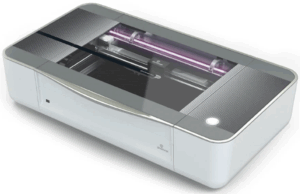
Glowforge Plus HD
Laser Cutter and Engraver
Glowforge Tutorial

Makerbot Replicator Desktop (5th Generation)*
3D Printer
MakerBot Replicator Desktop Tutorial
*Some of the equipment have supply costs associated with using library-supplied materials.
Makerspace To Go is a collection of creative technology and traditional crafting equipment that are available to check out with your library card. Check outs are for 3 weeks, so you have plenty of time to learn the equipment and complete projects. Anyone over the age of 18 can check out Makerspace To Go equipment. You must sign an Equipment Agreement Form before checking out the equipment.
You can reserve Makerspace To Go equipment through the Library Catalog. Please note that while you can request these items from the WAGGIN catalog, they can only be checked out from/returned to the Peters Township Public Library.
In order to help you make the most of these tools, we created some tutorials that may help! Click the Tutorial link below any of the items to find out more.
Makerspace To Go Equipment:

BIGASUO LED Projector
Portable Bluetooth Projector
BIGASUO LED Projector Tutorial
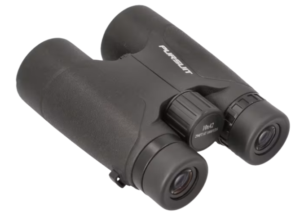
Binoculars
The Binoculars Kit comes with a user guide.

Cricut Maker 3
Smart Cutting Machine
Cricut Maker 3 Tutorial
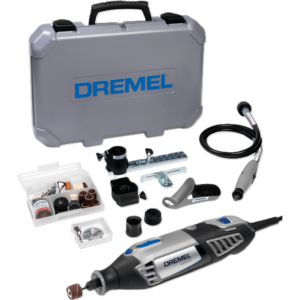
Dremel 4000
Rotary Power Tool
Dremel 4000 Tutorial

Finch Robot
Small Programmable Robot
Finch Robot Tutorial
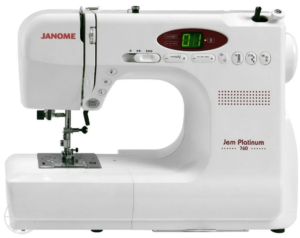
Janome Jem Platinum 760
Sewing Machine
Janome Jem Platinum 760 Sewing Machine Tutorial

Janome Memory Craft 350e
Embroidery Machine
Please note: the Janome embroidery machine requires a .jef file stored on a USB drive. The Library cannot convert other file types or create custom designs.
Janome Memory Craft 350e Embroidery Machine Tutorial

Janome Sewist 500
Sewing Machine
Janome Sewist 500 Sewing Machine Tutorial

Kenmore 385
Sewing Machine
Kenmore 385 Sewing Machine Tutorial
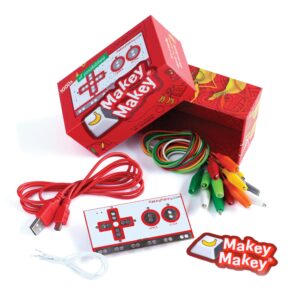
Makey Makey
Microcontroller
Makey Makey Tutorial

MonoMouse
Electronic magnifier
MonoMouse Tutorial

MYNT3D Super 3D Printing Pen
Handheld 3D Pen
MYNT3D Super 3D Pen Tutorial

Ozobot Robot
Small Programmable Robot
Ozobot Robot Tutorial

Roofull External Disc Drive
DVD player and disc writer
Roofull External Disc Drive Tutorial
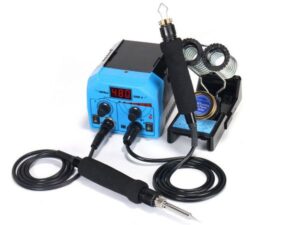
YIHUA Pyrography Pen
Woodburning Pen
YIHUA Pyrography Pen Tutorial
PTPL/WAGGIN Resources

Niche Academy offers a variety of tutorials. Tutorial topics range from Library eResources, to Microsoft Office, to Makerspace equipment. We have one general collection of tutorials and one collection of tutorials specific to Makerspace equipment. Check out what Niche Academy has to offer below!
POWER Library Resources

Auto Repair Source has accurate, Authoritative and up-to-date service and repair information for thousands of domestic and imported vehicles.

Perform research from hundreds of full text science encyclopedias, reference books, periodicals, and other reliable sources. View more than 280,000 high-quality science images from sources such as UPI, Getty, NASA, National Geographic and the Nature Picture Library.

Small Engine Repair Reference Center
Small Engine Repair Reference Center provides detailed repair guides for all types of small engines and resources that support routine maintenance and extensive repairs.
Additional Resources In...


Canva
Canva is a free graphic design program for creating any type of visual documents, such as flyers, bookmarks, cards and more! It is used by non-designers as well as professionals, and with it's drag-and-drop approach, can be used to create both web and print media design and graphics.


Ozobot
This site shows you how to play, create, and code your Ozobot robot in two different ways—screen-free with custom Color Codes, made with markers and paper, or connected with the OzoBlockly online coding editor.

Scratch
Scratch Junior
Scratch is a block-based visual programming language and online community targeted primarily at children. Users of the site can create online projects using a block-like interface for use on programmable robots, like a Finch.

Snap!
Snap! Reference Manual
Snap! (formerly BYOB) is a visual, drag-and-drop programming language. It differs from Scratch in that users can create and add their own programming blocks for use on programmable robots such as Finch.

Thingiverse
Thingiverse is the world's largest 3D printing community with millions of free downloadable 3D models. Browse through other people's designs and modify them to suit your needs. You can even upload your own modifications or new designs to share with others.

TinkerCAD
Tinkercad is an easy-to-use 3D CAD design tool. Quickly turn an idea into a CAD model and easily export the file for use on a 3D printer. Create a free account today. If you're new to 3D, try the built-in lessons to get started! If you're an old-hand, just jump right in and start drafting!
View Tutorial
POWER Library is made possible in part by Library Services and Technology Act (LSTA) funds from the U.S. Institute of Museum and Library Services and through the Commonwealth of Pennsylvania’s Library Access funds administered by the Pennsylvania Department of Education, Office of Commonwealth Libraries. The views, findings, conclusions, or recommendations expressed in this website do not necessarily represent those of the U.S. Institute of Museum and Library Services or the Pennsylvania Department of Education.